A Quick Look at the Multifunction Features of REXA SMART
Добавлено: 22 сен 2026, 10:14
One thing that stands out about the REXA SMART is that its touchscreen is designed for more than just displaying basic device information.
The 2.01-inch HD touchscreen brings multiple functions together in one interface, with a Menu for accessing different features and a Quick Panel for convenient access to frequently used settings.
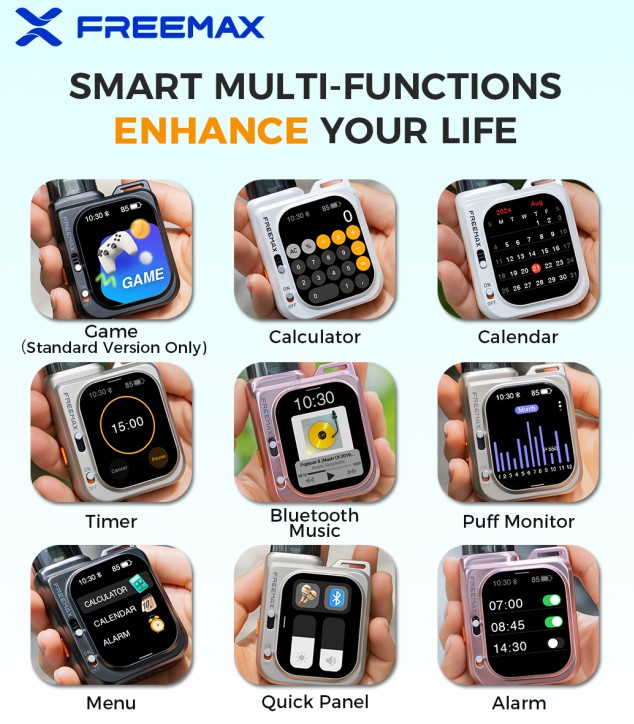
Here’s a quick look at what’s available:
Menu – Access the different functions and settings from one central interface.
Quick Panel – Quickly access commonly used settings without going through the full menu.
Bluetooth Music – Connect via Bluetooth and control music from the device.
Puff Monitor – Check puff-related information directly on the screen.
10 Themes – Choose from different interface themes to personalize the display.
Timer – A simple built-in timer for everyday use.
Calculator – A basic calculator is available directly from the touchscreen.
Calendar – Check the date without switching to another device.
Alarm – Set an alarm directly from the device.
Game – The Standard Version also includes a built-in game for some extra entertainment.
What I find interesting is that the touchscreen isn't limited to showing device information. The Menu and Quick Panel make it easier to navigate between different functions, while the built-in tools add some extra everyday convenience.
Overall, it makes the Freemax Rexa Smart device feel more like a small multifunction smart device rather than simply a screen for basic controls.
The 2.01-inch HD touchscreen brings multiple functions together in one interface, with a Menu for accessing different features and a Quick Panel for convenient access to frequently used settings.
Here’s a quick look at what’s available:
Menu – Access the different functions and settings from one central interface.
Quick Panel – Quickly access commonly used settings without going through the full menu.
Bluetooth Music – Connect via Bluetooth and control music from the device.
Puff Monitor – Check puff-related information directly on the screen.
10 Themes – Choose from different interface themes to personalize the display.
Timer – A simple built-in timer for everyday use.
Calculator – A basic calculator is available directly from the touchscreen.
Calendar – Check the date without switching to another device.
Alarm – Set an alarm directly from the device.
Game – The Standard Version also includes a built-in game for some extra entertainment.
What I find interesting is that the touchscreen isn't limited to showing device information. The Menu and Quick Panel make it easier to navigate between different functions, while the built-in tools add some extra everyday convenience.
Overall, it makes the Freemax Rexa Smart device feel more like a small multifunction smart device rather than simply a screen for basic controls.